运行配置错误码
00401000 获取包名信息失败
错误信息The bundleName attribute does not exist.
错误描述获取包名信息失败。
可能原因app.json5文件的bundleName为空或者缺少bundleName配置。
处理步骤检查下app.json5文件的bundleName是否正确。
00401001 attach调试获取不到product
错误信息The product to debug cannot be empty.
错误描述attach调试获取不到product。
可能原因当前模块配置的product不正确。
处理步骤检查工程级build-profile.json5文件中对应模块的applyToProducts配置是否正确,详细配置可以参考构建定义的目标产物。
00401002 attach调试获取不到target
错误信息The target to debug cannot be empty.
错误描述attach调试获取不到target。
可能原因当前模块配置的target不正确。
处理步骤检查工程级build-profile.json5文件中对应模块的applyToProducts配置是否正确,详细配置可以参考构建定义的目标产物。
00401003 启动调试失败
错误信息Failed to start debugging. Click the Debug button again to retry.
错误描述启动调试失败。
可能原因启动调试异常。
处理步骤重新点击Debug按钮启动调试。
00401004 SysCap能力校验不通过
错误信息Please try to match the API version of the device and the app. The current device does not contain the following SysCap attributes in the rpcid.json file: XXX. Make sure the device supports all the SysCap attributes required for running the app.
错误描述设备缺少SysCap能力,应用需要的XXX能力在当前连接的设备不支持。
可能原因设备版本和应用不配套。
处理步骤-
方式一:升级设备系统版本。
-
方式二:在hap模块的src/main目录下新建syscap.json文件,移除错误信息中不支持的SysCap。
以SystemCapability.Security.DeviceAuth为例:
// entry/src/main/syscap.json{"devices": {"general": ["phone"] // 同module.json5中的deviceTypes},"production": {"removedSysCaps": ["SystemCapability.Security.DeviceAuth"]}}
00401005 未指定Ability
错误信息Error running entry : Ability not specified.
错误描述未指定Ability。
可能原因在运行/调试配置面板中选择Specified Ability后,没有指定Ability。
处理步骤打开运行/调试配置面板,在Specified Ability下面设置Ability。

00401006 预览器不支持以release构建模式进行调试
错误信息Cannot debug the project in previewer when its build mode is release.
错误描述预览器不支持以release构建模式进行调试。
可能原因当前使用预览器调试,并且构建模式是release。
处理步骤修改构建模式为debug后再次启动调试。
00401007 工程同步过程中不能运行/调试
错误信息Project sync is in progress. Wait until it is complete before you start running or debugging.
错误描述工程正在同步中,需要等待工程同步完成后再启动运行/调试。
可能原因在工程同步过程中启动运行/调试。
处理步骤等待工程同步完成后再启动运行/调试。
00401008 运行/调试配置面板中的模块为空
错误信息No module found. Make sure the project sync is completed successfully and the module is set in Edit Configuration > General.
错误描述当前运行/调试配置面板中的模块为空。
可能原因工程同步失败。
处理步骤重新同步下工程并确保同步成功。
00401009 运行获取不到target
错误信息The target can not be empty. Check the build-profile.json5 file of the project root directory and make sure the targets of the modules in configuration is set to specified product: default in applyToProducts.
错误描述运行时target不能为空。
可能原因当前模块配置的target不正确。
处理步骤检查工程级build-profile.json5文件中对应模块的applyToProducts配置是否正确,详细配置可以参考构建定义的目标产物。
00401010 运行获取不到product
错误信息The product can not be empty.
错误描述运行时product不能为空。
可能原因product配置不正确。
处理步骤检查工程级build-profile.json5文件中对应模块的applyToProducts配置是否正确,详细配置可以参考构建定义的目标产物。
00401011 没有启动任何Ability时,无法运行或调试应用
错误信息Cannot run or debug the app when no ability is launched. Specify an ability (the default or any specified one) to launch under Launch Options in Run/Debug Configurations, and then try again.
错误描述当没有启动任何Ability时,无法运行或调试应用。请在运行/调试配置面板中的“启动选项”下指定一个Ability(default或任意指定一个),然后重试。
可能原因运行/调试配置面板的Launch Options为Nothing。
处理步骤请在运行/调试配置面板中的“启动选项”下指定一个Ability(default或任意指定一个),然后重试。
00401012 预览器调试不支持ExtensionAbility
错误信息Debugging with Previewer does not support the ExtensionAbility type.
错误描述预览器调试不支持ExtensionAbility。
可能原因预览器调试时,运行/调试配置面板的Specified Ability是ExtensionAbility。
处理步骤请在运行/调试配置面板中的“启动选项”下指定一个Ability(default或指定一个非ExtensionAbility),然后重试。
00401013 预览器调试不支持此应用
错误信息Previewer does not support this app.
错误描述预览器调试不支持此应用。
可能原因- 不支持FA模型工程。
- 不支持API 10以下工程。
- 使用预览器运行调试API 10及以上Stage工程。
- 重新选择其他设备/仿真器运行调试。
00401014 仿真器不支持此应用
错误信息Simulator does not support this app.
错误描述仿真器不支持此应用。
可能原因应用不是Lite Wearable应用。
处理步骤- 如果是非Lite Wearable工程,请使用真机或者模拟器运行。
- 如果是Lite Wearable工程,确保config.json文件的设备列表中包含liteWearable。
00401015 请先选择设备
错误信息Select a device first.
错误描述请先选择设备。
可能原因没有选择设备。
处理步骤请连接设备,或者启动模拟器并选择设备,再启动运行或调试。
00401016 当前操作出现异常,请重新运行
错误信息Some exceptions occurred in this operation, please re-run.
错误描述当前操作出现异常,请重新运行。
可能原因当前连接设备异常。
处理步骤拔插下设备再重新运行。
00401017 安装Hap包失败
错误信息FileTransfer Failed: Error while Deploy Hap.
错误描述安装Hap包失败。
可能原因当前设备连接异常。
处理步骤- 使用真机场景:请更换数据线或PC侧USB接口后尝试。
- 使用模拟器场景:
- 在Local Emulator的设备列表窗口,点击“Wipe User Data”清除数据,启动模拟器并重新运行工程。
- 打开命令行终端,并进入DevEco Studio安装目录下的sdk\default\openharmony\toolchains路径,执行
hdc kill -r命令,启动模拟器,重新运行工程。
00401018 获取设备系统API版本失败
错误信息Failed to get the device apiVersion.
错误描述获取设备系统API版本失败。
可能原因当前选择设备连接异常。
处理步骤重新连接设备或者重启DevEco Studio。
00401019 工程配置的最低兼容API版本和设备API版本不匹配
错误信息compatibleSdkVersion and releaseType of the app do not match the apiVersion and releaseType on the device.
错误描述工程配置的最低兼容API版本和设备API版本不匹配。
可能原因当前工程配置的最低兼容版本高于设备API版本。
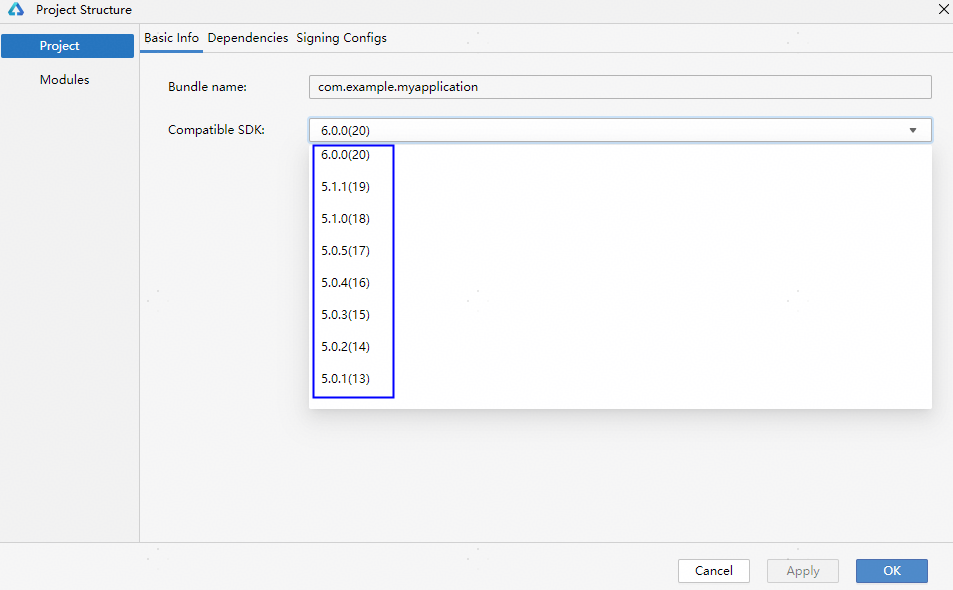
处理步骤使用命令hdc shell param get const.ohos.apiversion查询当前设备的API 版本,并对比工程级build-profile.json5文件中的compatibleSdkVersion字段。如果版本不匹配,可以使用以下解决办法:
方法一:请升级设备系统版本以匹配当前工程版本。在系统设置界面升级设备系统。
方法二:降低工程的API版本,点击DevEco Studio右上角的 ,Compatible SDK选择更低的版本号,以兼容设备的API版本。
00401020 没有可用的端口号
错误信息No port available.
错误描述没有可用的端口号。
可能原因当前电脑端口被管控或者端口号被占用。
处理步骤- 排查是否有安全软件禁用端口,关闭端口管控。
- 重启电脑。
00401021 找不到可执行的ability
错误信息No executable ability found.
错误描述找不到可执行的ability。
可能原因配置的ability不对,工程没同步成功。
处理步骤重新同步工程。
00401022 本地HAP包不存在
错误信息The local package does not exist.
错误描述本地HAP包不存在。
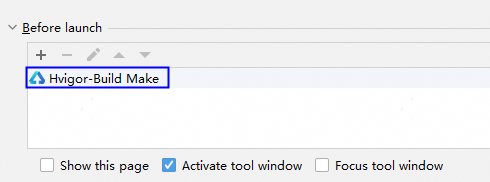
可能原因- 没有构建打包成功。
- 运行配置取消了构建任务,本地没有HAP包。
- 工程同步异常,没有生成构建需要的sync目录。
-
点击菜单栏Build > Clean Project清理缓存,再重新运行。
-
检查运行配置是否取消了构建任务,如果取消就重新添加构建任务。
-
点击菜单栏File > Sync and Refresh Project重新同步工程,等待同步成功后再运行。
00401023 hap包中config.json或module.json文件不存在
错误信息The config.json or module.json file in the hap file does not exist.
错误描述hap包中config.json或module.json文件不存在。
可能原因编译构建生成的hap包不正确。
处理步骤点击菜单栏Build > Clean Project清理缓存,再重新运行。
00401024 HAP文件数量超过100w
错误信息Make sure the file count in the HAP does not exceed 1,000,000.
错误描述HAP文件数量不要超过1,000,000。
可能原因生成的HAP包里面文件数量超过了1,000,000,可能资源文件太多。
处理步骤排查并精简下工程资源文件再重新打包。
00401025 hap包中config.json或module.json文件内容为空
错误信息The config.json or module.json file content is empty.
错误描述hap包中config.json或module.json文件内容为空。
可能原因编译构建生成的hap包不正确。
处理步骤点击菜单栏Build > Clean Project清理缓存,再重新运行。
00401026 当前连接设备类型或apiVersion与工程配置不匹配
错误信息The deviceType or apiVersion of the target device does not match that configured in the XXX file.
错误描述当前连接设备的类型或apiVersion与工程配置不匹配。
可能原因- 工程中config.json或module.json5文件配置的设备类型和当前选择的设备不匹配。
- 模块级build-profile.json5文件的apiVersion和当前选择的设备不匹配。
- 更换匹配的设备。
- 在config.json或module.json5文件增加当前连接的设备类型,模块级build-profile.json5文件的apiVersion增加当前设备对应的API。
00401027 当前连接设备为空
错误信息The current device cannot be empty.
错误描述当前连接设备为空。
可能原因未连接设备,或设备连接异常。
处理步骤重新拔插下设备再启动调试。
00401028 FA模型工程不支持DebugLine
错误信息The FA model does not support the debugLine.
错误描述FA模型工程不支持debugLine。
可能原因FA工程模型不支持debugLine。
处理步骤在运行/调试配置面板取消勾选Enable DebugLine。
00401029 获取SDK版本失败
错误信息Failed to obtain the SDK version. Check whether the SDK is installed.
错误描述获取SDK版本失败,检查SDK是否安装。
可能原因未下载SDK或者用户自定义SDK配置有问题。
处理步骤下载对应SDK或者重新配置自定义SDK。
00401030 SDK版本太低,不支持DebugLine
错误信息The SDK version is too low to support DebugLine. Update it to 4.1.0.21 or a later version.
错误描述SDK版本太低,不支持DebugLine,需要升级SDK版本到4.1.0.21及以上版本。
可能原因当前SDK版本低于4.1.0.21版本。
处理步骤在官网上重新下载DevEco Studio。
00401031 获取Hvigor版本失败
错误信息Failed to obtain the Hvigor version.
错误描述获取Hvigor版本失败。
可能原因DevEco Studio中缺少hvigor工具。
处理步骤检查DevEco Studio安装目录的tools目录下是否有hvigor工具,如果不存在,在官网上重新下载DevEco Studio。
00401032 Hvigor版本太低,不支持DebugLine
错误信息The Hvigor version is too low to support DebugLine. Update it to 3.0.3-rc.1.s or a later version.
错误描述Hvigor版本太低,不支持DebugLine,需要升级Hvigor版本到3.0.3-rc.1.s及以上版本。
可能原因DevEco Studio版本太低。
处理步骤在官网上重新下载DevEco Studio。
00401033 当前SDK版本不支持Tsan
错误信息TSan is not supported by the current SDK version. Update the DevEco Studio to the latest version and make sure the API version of your project is 12 or later.
错误描述当前SDK版本不支持Tsan,升级DevEco Studio到最新版本并且确保工程是API 12及以上版本。
可能原因DevEco Studio版本太低或者工程低于API 12。
处理步骤升级DevEco Studio到最新版本并且确保工程是API 12及以上版本。
00401034 主模块为空
错误信息Main module is null.
错误描述主模块为空。
可能原因工程未同步成功。
处理步骤点击菜单栏File > Sync and Refresh Project重新同步下工程,确保工程同步成功再运行工程。
00401035 当前设备不支持线程检测
错误信息Thread Sanitizer is not supported on the target device. Disable this feature under Run > Edit Configurations > Diagnostics and try again. This feature is only available on phone,tablet,2in1,tv.
错误描述当前连接设备不支持TSan检测,在运行配置中取消勾选TSan检测再重试。TSan检测仅支持phone、tablet、2in1、tv设备。
可能原因当前连接设备类型不是phone、tablet、2in1、tv。
处理步骤更换支持TSan检测的设备,或者点击Run > Edit Configurations > Diagnostics取消勾选Thread Sanitizer。
00401036 当前设备系统版本不支持TSan检测
错误信息TSan is not supported on the current system version of the target device. Update the device system version to the latest version.
错误描述当前设备系统版本不支持TSan检测,更新设备系统到最新版本。
可能原因当前设备系统版本不支持TSan检测。
处理步骤更新设备系统到最新版本。
00401037 当前选择的运行配置是热重载,不支持使用预览器运行/调试
错误信息Cannot run or debug this module in Previewer while it has hot reload configured. Remove the hot reload configuration and try again.
错误描述当前选择的运行配置是热重载,不支持使用预览器运行/调试,请重新选择运行配置再重试。
可能原因当前选择的运行配置是热重载,不支持使用预览器运行/调试。
处理步骤使用真机或模拟器运行/调试,或者重新选择运行配置在预览器运行/调试。
00401052 HAP包中配置文件超过10MB
错误信息Make sure the module.json file in the HAP does not exceed 10 MB.
错误描述确保HAP包中配置文件module.json不超过10MB。
可能原因HAP包中module.json5配置文件超过10MB。
处理步骤优化module.json5配置文件内容。
00401060 本地HAP包不存在
错误信息Failed to open the file. The directory or file does not exist.
错误描述本地HAP包不存在。
可能原因HAP包不存在,检查签名HAP包是否打包成功。
处理步骤确保签名HAP包打包成功后再运行,签名请参考配置调试签名。
00401061 权限不足无法访问HAP包所在路径
错误信息Failed to open the file. The current directory is not accessible due to insufficient permissions.
错误描述推包失败,权限不足无法访问HAP包所在路径。
可能原因权限不足无法访问HAP包所在路径。
处理步骤Windows系统建议将工程移出C盘,MAC系统设置DevEco Studio获取完全磁盘访问权限,然后重新运行。
00401062 设备磁盘空间不足
错误信息File transfer failed due to insufficient disk space on the device.
错误描述推包失败,设备磁盘空间不足。
可能原因设备磁盘空间不足,无法写入数据。
处理步骤请检查设备磁盘空间。如果是模拟器,可以点击“Wipe User Data”清除模拟器数据,然后重新运行模拟器。
00401063 仿真器不支持以release模式调试
错误信息Cannot debug the project in the Simulator when its build mode is release.
错误描述仿真器不支持以release模式调试。
可能原因当前使用仿真器调试,并且构建模式是release。
处理步骤修改构建模式为debug后再次启动调试。